
Module
Inventory & Assets
Capture, label, lend and count — the fastest way to your first win with Kernas.
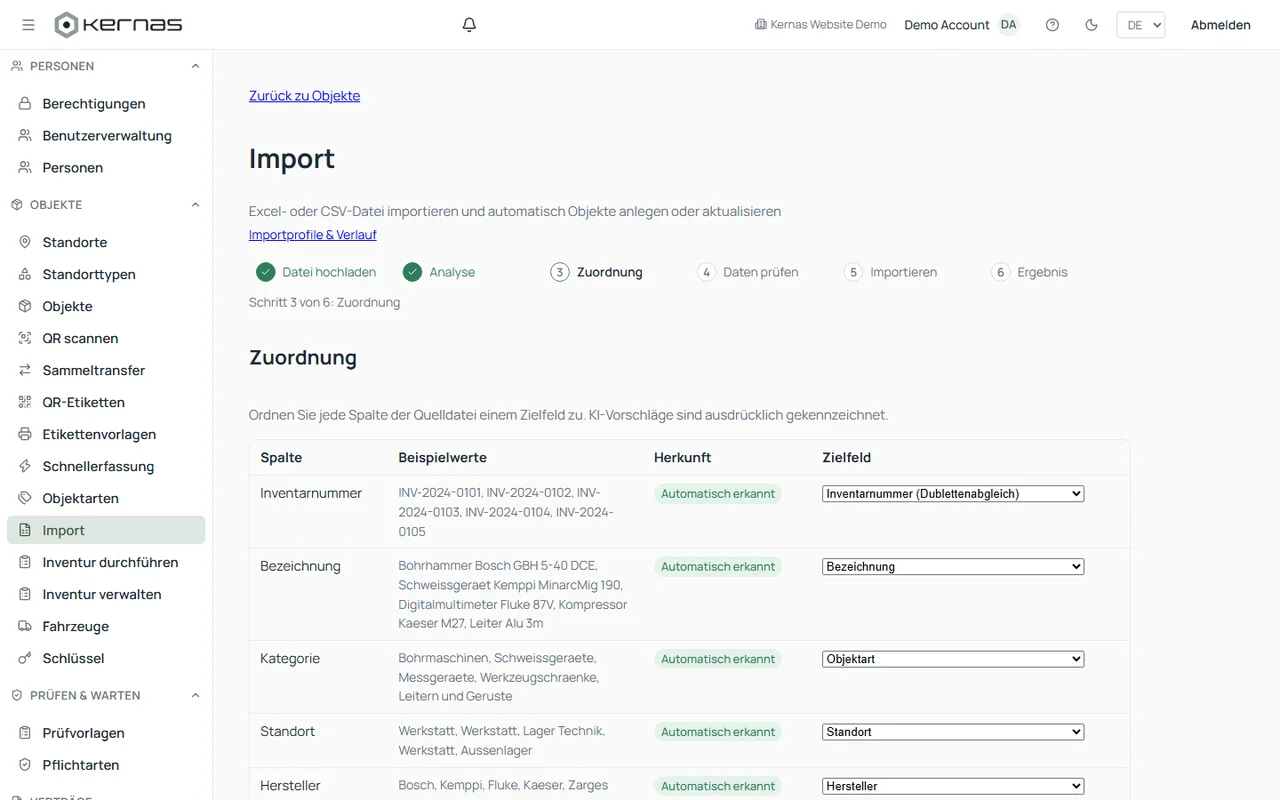
AI import
Upload an existing Excel, CSV or PDF list — Kernas recognizes the columns automatically and suggests the right mapping.
Manual capture
Add assets one by one, including photo, manufacturer, model and serial number.
QR code labels
Print labels from freely designed templates — one at a time or for many assets at once.
Loan & return
Lend assets to people and take them back — with signature, condition notes and automatic reminders.
Stocktaking on mobile
Scan and reconcile stock on site, no paper and no spreadsheets.
Photos & location
Attach photos and documents and mark the location on the floor plan.
Frequently asked questions about inventory management
What is digital inventory management?
Digital inventory management captures and manages inventory, equipment and other assets centrally in one piece of software. With Kernas, you can also assign a location, a responsible person, a status, inspections and other information to each asset.
How are assets captured?
Manually, or through an AI-assisted import from an existing Excel or CSV list.
Can assets be labelled with QR codes?
Yes, from freely designable label templates — individually or for many assets at once.
Can assets be checked out to people?
Check-out and return can be documented with a signature and a condition note, including an automatic reminder if something is overdue.
Does stocktaking also work on a smartphone?
Yes, stock can be scanned and reconciled directly on site.
Ready to digitize your inventory?
Get started with Kernas today.
- GDPR-compliant
- Swiss-made
- Modern encryption
- Regular backups
Up to 50 objects free forever · no credit card required